
See how Luna Kitchen Co. turned manual inbox orders into a streamlined online checkout with PaymentForm.io—reducing order messages by 48% and order processing time by 41% in 30 days.
Manual inbox orders can work when a business gets only a few customers a day. But once social media starts bringing steady interest, the same process becomes hard to manage.
Customers ask for prices, product photos, stock updates, payment details, delivery charges, and order confirmation. The owner has to reply again and again, collect addresses manually, track stock in a spreadsheet, and confirm payments one by one.
That is what happened to Luna Kitchen Co., a small business that sells smart kitchen gadgets through Instagram, Facebook, and Pinterest.
Maya, the owner, had built a strong following by sharing short product videos, kitchen tips, and practical demos. People liked the products and wanted to order. But as daily orders increased, her inbox became crowded with repeated questions and unfinished orders.
She explored options like Shopify, WordPress, and other e-commerce tools. But most of them came with higher costs and more maintenance than her small order workflow actually needed.
Maya did not want to build a full e-commerce store yet. She needed a simpler way to accept online orders, collect customer details, manage product options, and take payments from one place.
That is when she started using PaymentForm.io.
With the multi-product module, Luna Kitchen Co. created one clean order form where customers could choose products, select variations, add delivery details, apply coupons, and pay online.
Case Study Snapshot
- Business type: Small online product business
- Business name: Luna Kitchen Co.
- Products: Smart kitchen gadgets, cooking tools, storage accessories, and compact kitchen helpers
- Sales channels: Instagram, Facebook, Pinterest, and direct messages
- Main challenge: Manual inbox orders were becoming difficult to manage
- Solution used: PaymentForm.io
- Review period: 30 days after launching the online order form
Results at a Glance
After moving manual inbox orders to PaymentForm.io, Luna Kitchen Co. saw clear improvements:
- Manual order messages dropped by 48%
- Order processing time reduced by 41%
- More customers completed payment from the first shared order link
- Stock and product variation records became easier to review
- Abandoned form data helped recover more interested buyers
- Sales reports gave better visibility into product performance
The business did not grow by adding more manual work. It grew by making the buying process easier.
The Problem Before PaymentForm.io
Luna Kitchen Co. started as a social-first product business.
Maya promoted kitchen gadgets through short videos, carousel posts, product demos, and Pinterest pins. Her followers liked the practical nature of the products. Most items solved small kitchen problems, such as storage, cutting, measuring, cleaning, or faster cooking prep.
Customers often asked: "How much?", "Is this available?", "Do you have another size?", "How can I order?", and "Can you send payment details?"
At first, Maya replied to every message herself. She sent product images, explained features, confirmed prices, checked stock, collected customer details, shared payment instructions, and waited for payment confirmation.
This worked when orders were low. But as her posts started getting more reach, the inbox became crowded.
Some customers asked the same questions again and again. Some confirmed orders but did not pay. Some sent incomplete delivery addresses. Some asked for a discount code. Some wanted a product variation that was already out of stock.
The problem was not product demand. The problem was the manual order process.
Why Inbox Orders Became Hard to Manage
The old workflow had too many small steps. A customer saw a product on social media and sent a message. Maya replied with the product details. Then she checked stock, confirmed the variation, asked for delivery information, calculated shipping, shared payment details, waited for confirmation, and updated the order in a spreadsheet.
Every order needed several messages. This created four main problems:
- Product details were repeated too often. Maya had to send the same images, prices, and descriptions to different customers every day.
- Stock was hard to track. When several people asked about the same product, it was easy to lose track of available quantity.
- Payment was delayed. Customers had to wait for payment instructions instead of paying when they were ready to buy.
- Order records were scattered. Product choices, customer details, shipping notes, payment status, and delivery information were spread across inboxes and spreadsheets.
Maya needed a more organized way to sell online without turning her simple business into a complex e-commerce setup.
Why PaymentForm.io Was a Better Fit Than a Full Store
Maya considered building an e-commerce website with Shopify or WordPress. But for her current stage, a full store felt too costly and required more maintenance than she wanted to handle.
She did not need a large store, complex theme, or full cart system. Her customers already discovered products on Instagram, Facebook, and Pinterest. She only needed a clean checkout flow that could sit between social interest and completed orders.
Then she explored PaymentForm.io, which gave her that middle path. It was more organized than inbox selling, but lighter than building a full online store. She also wanted to avoid extra platform transaction fees, and PaymentForm.io does not charge any transaction fees on her sales.
With one multi-product module, Maya now shows products, collects customer details, manages product options, calculates shipping, applies coupons, accepts payment, sends confirmations, and reviews sales from one place.
How Luna Kitchen Co. Built the Order Form
Luna Kitchen Co. designed the order form to make product buying simple for social media customers.
At the top of the form, Maya added a branded banner, a short form title, and a clear description. This helped customers quickly understand what the form was for before browsing the products.
She also added filter by category and sort by options. Since the form included different smart kitchen gadgets, customers could easily find the type of product they wanted without scrolling through the full list.
- Smart oil sprayer
- Digital kitchen scale
- Electric garlic chopper
- Silicone food storage lids
- Compact vegetable cutter
- Magnetic spice jars
Each product had an image, short description, price, and quantity option, so customers could choose what they wanted without asking for details in the inbox.
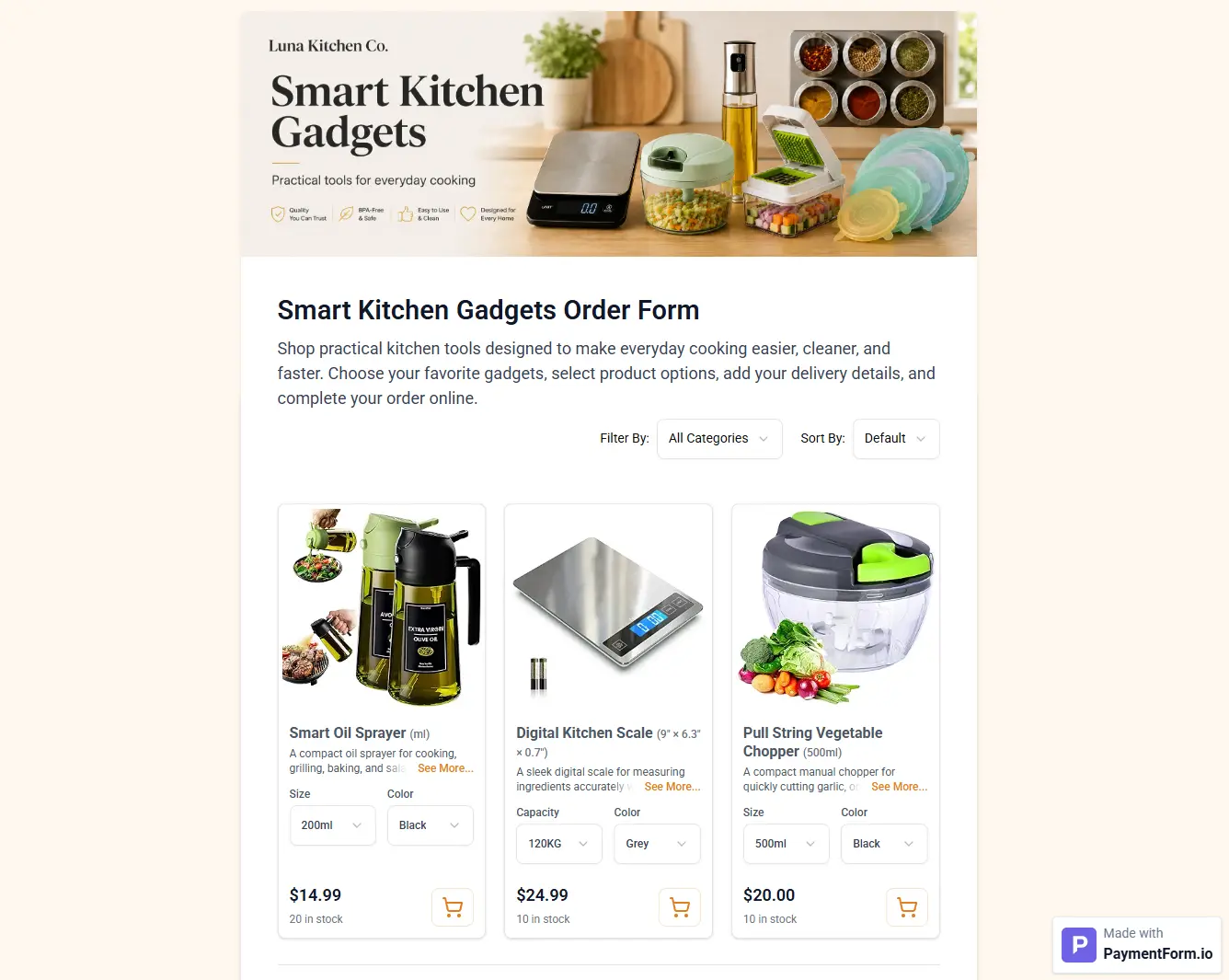
For products with options, Maya added variations such as size, color, bundle type, and pack size. This made the form more useful for products like storage lids, spice jars, and oil sprayers, where customers often wanted to choose the right option before ordering.
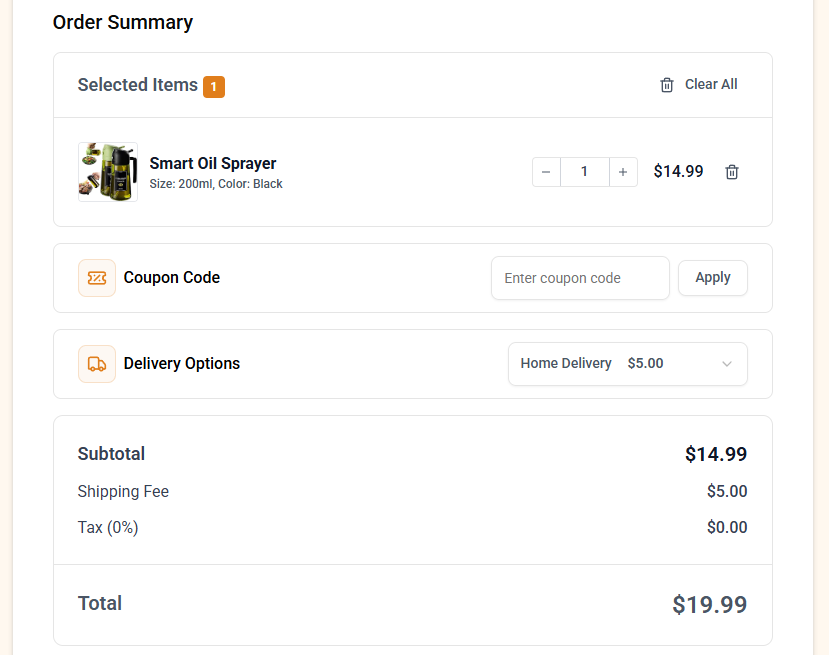
The second part of the form showed the order summary. Customers could review selected products, apply a coupon code, choose a delivery option, and see the shipping fee before checkout. This reduced confusion about the final price and helped Maya avoid repeated questions about discounts and delivery charges.
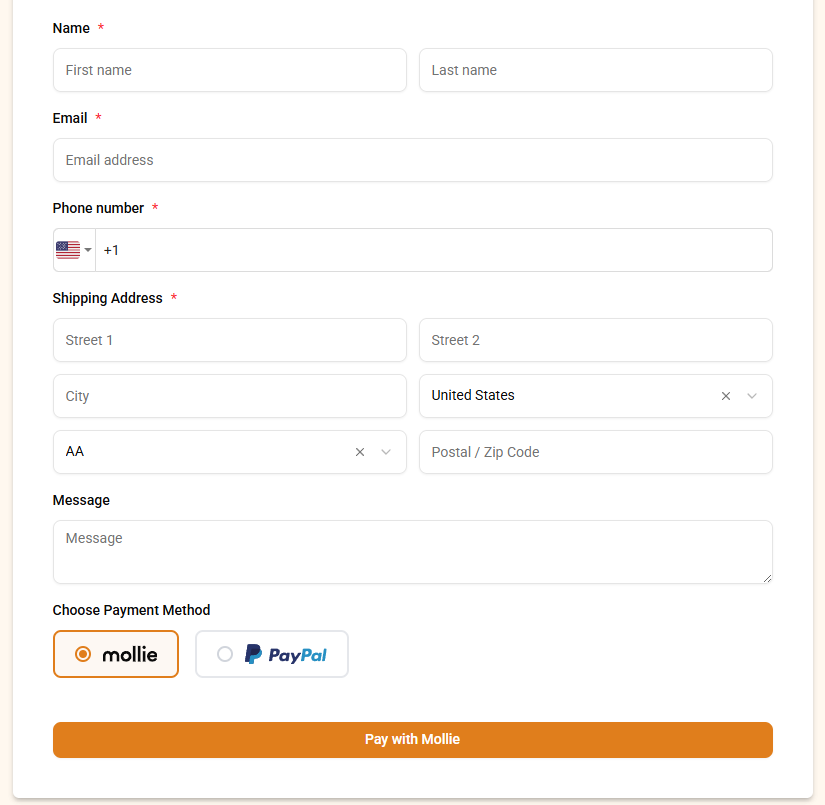
The final part of the form collected the customer's name, email, phone number, address, and delivery details. Customers could then select a payment method, including Mollie or PayPal, and complete the order using the pay button.
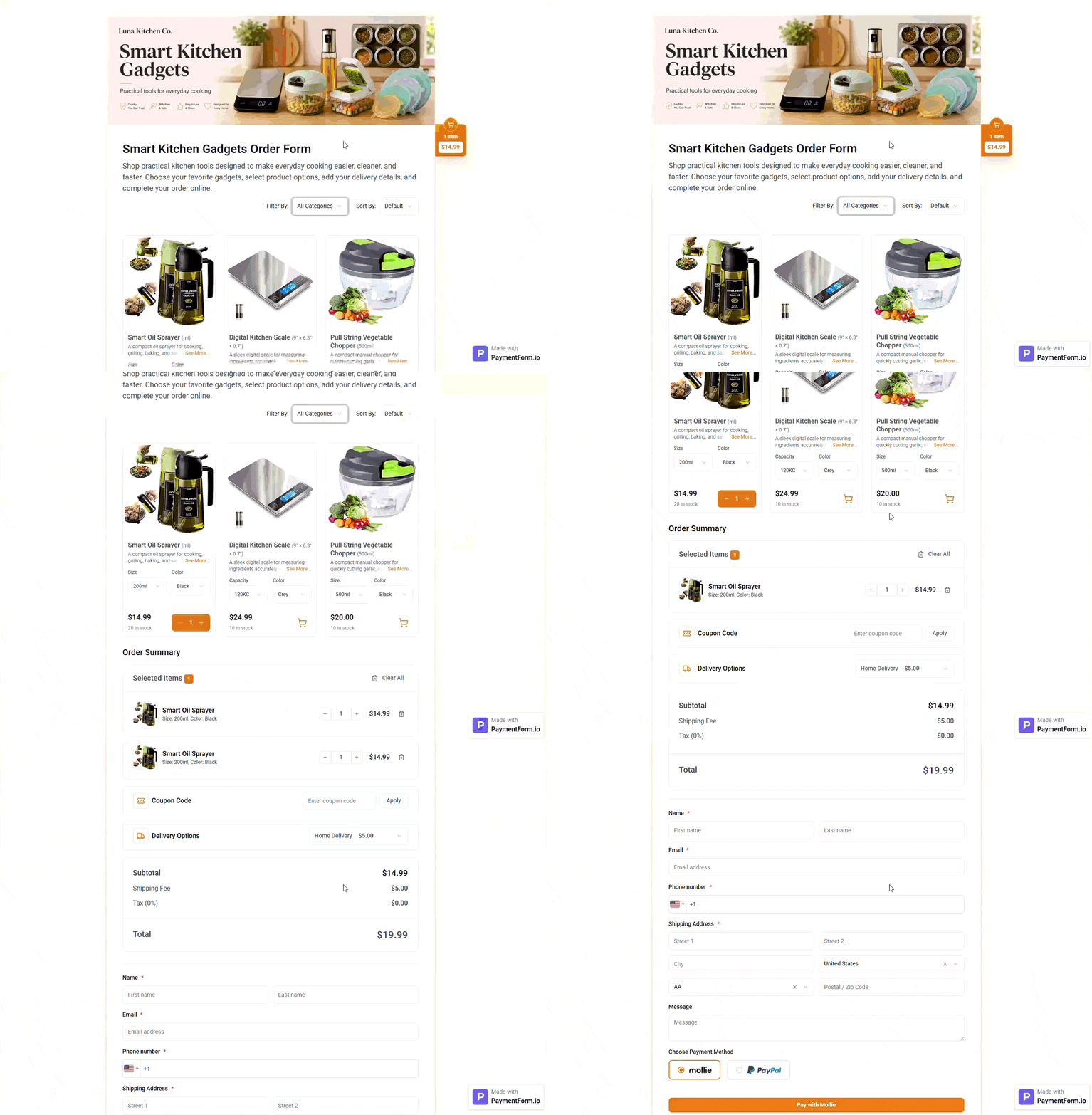
This made the form complete enough to collect real online orders, but still simple enough for social media buyers who wanted a fast checkout experience. Here is the preview of the form that Maya built with PaymentForm.io.
The New Online Order Workflow
After setting up the form, Maya stopped taking full orders through long inbox conversations. When someone asked about a product, she replied with one simple message: "You can view the available kitchen gadgets and place your order here."
The customer opened the PaymentForm.io order link, selected the product, chose the variation, entered delivery details, applied a coupon if available, and paid online.
PaymentForm.io helped the business accept payments through popular gateways such as Stripe, PayPal, Mollie, and Razorpay. After the order was placed, customers could receive automated emails with order details, and Maya could send invoices when needed.
PaymentForm.io also supported webhooks, so Maya could send order and customer details to tools like Zoho CRM or Zoho Campaigns. The same order form could be shared in Instagram bio, Facebook posts, Messenger replies, Pinterest pins, WhatsApp messages, and email.
How PaymentForm.io Helped Sell More With Less Manual Work
PaymentForm.io did more than collect payments. The multi-product module helped Maya sell several products from one order form. Stock management helped her avoid selling items that were no longer available.
Shipping fees and coupon options helped her run simple campaigns. Abandoned form tracking helped her understand where buyers dropped off. Sales reports helped her see which products performed best.
The biggest change was time. Maya no longer had to guide every customer manually from interest to payment. The form handled most of that process.
Results After 30 Days
After 30 days, Luna Kitchen Co. had a cleaner order process. Manual order messages dropped by 48%, order processing time reduced by 41%, and more customers completed payment from the first shared link.
The business also looked more professional. Customers could view product details, choose options, add delivery information, and pay from one page. Maya could review orders without digging through long message threads.
The result was not only faster payment. It was a better buying experience.
Why PaymentForm.io Worked for This Small Business
PaymentForm.io worked because it matched how Luna Kitchen Co. already sold products. The business was social-first, and customers wanted a quick way to buy the product they had just seen.
PaymentForm.io turned that interest into a direct checkout flow. It helped Maya keep social media as the main promotion channel while moving the actual order process into a cleaner system.
What Other Small Businesses Can Learn
Small business owners do not always need a full online store to start accepting online orders. Sometimes, they need a simple product order form that helps customers buy faster and helps the owner manage orders better.
PaymentForm.io can be useful for businesses selling kitchen gadgets, beauty products, home decor, handmade items, gift boxes, food items, accessories, small electronics, or custom bundles.
A product order form can reduce repetitive replies, collect complete customer details, accept online payments, manage shipping fees, apply coupons, track abandoned forms, and keep sales records easier to review.
Conclusion
Luna Kitchen Co. did not struggle because customers were not interested. The business struggled because orders were growing faster than the inbox process could handle.
PaymentForm.io gave Maya a simpler way to accept online orders without any transaction fees. With one multi-product order form, she could show product images and details, add variations, manage stock, apply shipping fees, offer coupons, accept payments, send automated emails, generate invoices, share QR codes, review sales reports, and use abandoned form data to recover more buyers.
For small business owners who sell through Instagram, Facebook, Pinterest, or direct messages, PaymentForm.io offers a practical way to turn social interest into completed online orders.